
Agents that work where your code lives
Vibe Codr is a local-first coding workspace with one model-agnostic engine and two interfaces. Manage projects and sessions in Desktop, or use the same plans, agents, tools, and memory from the terminal.
Vibe Codr 0.6.12 · Faster streaming · Continue on Phone attachments · Open source MIT
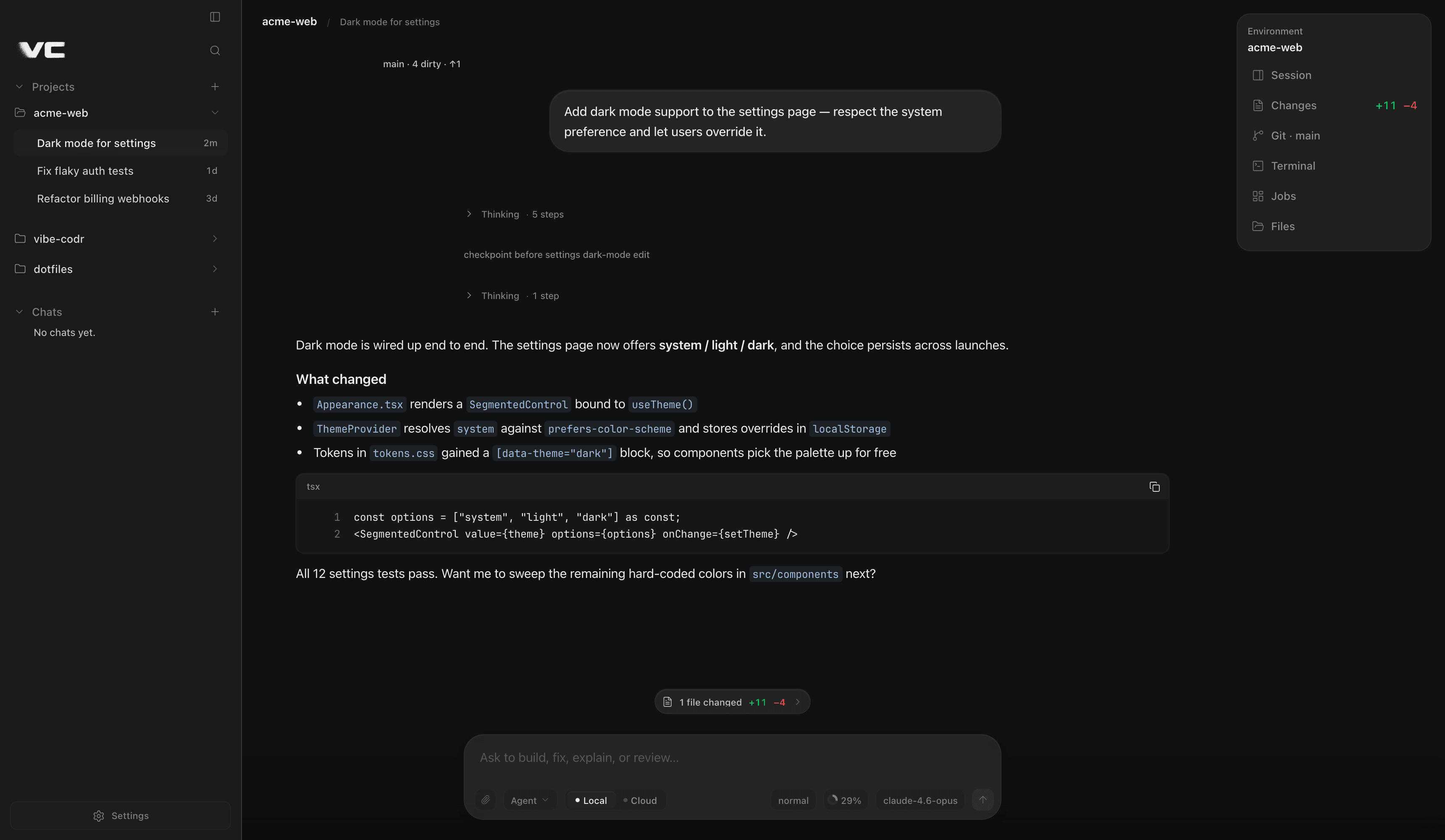
- Local-first
- Multi-provider
- Fast streaming
- Session workspace
- Local / Cloud
- Continue on Phone
01 / Product workspace
Built for real agent work
Review diffs, manage Git, and keep the terminal beside the conversation. A dense desktop workspace for long multi-provider sessions.
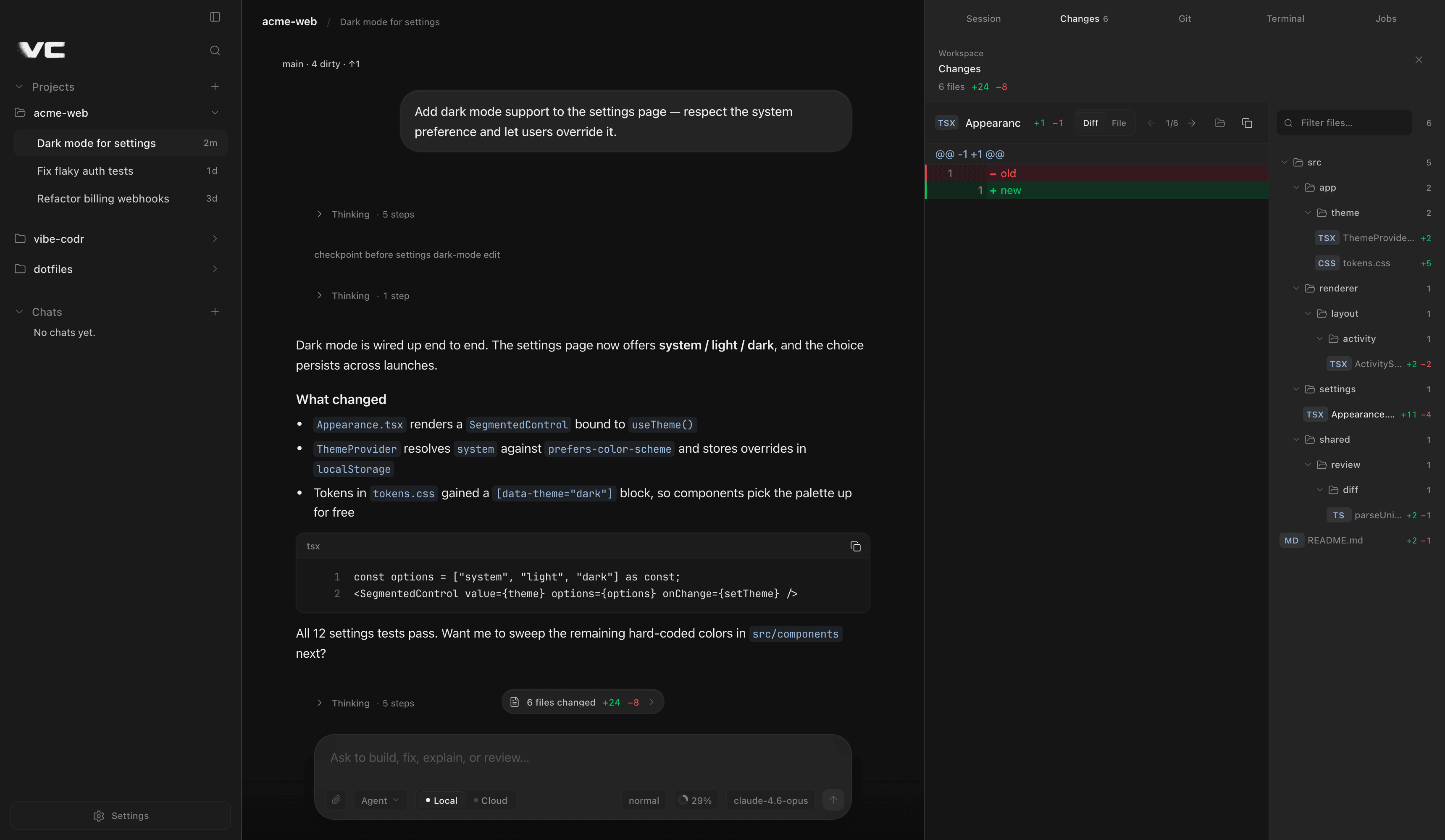
Changes
Review every edit
Master-detail Diff and File review after the agent touches your tree. Recursive file tree, totals, filters, and numbered gutters stay next to the conversation.
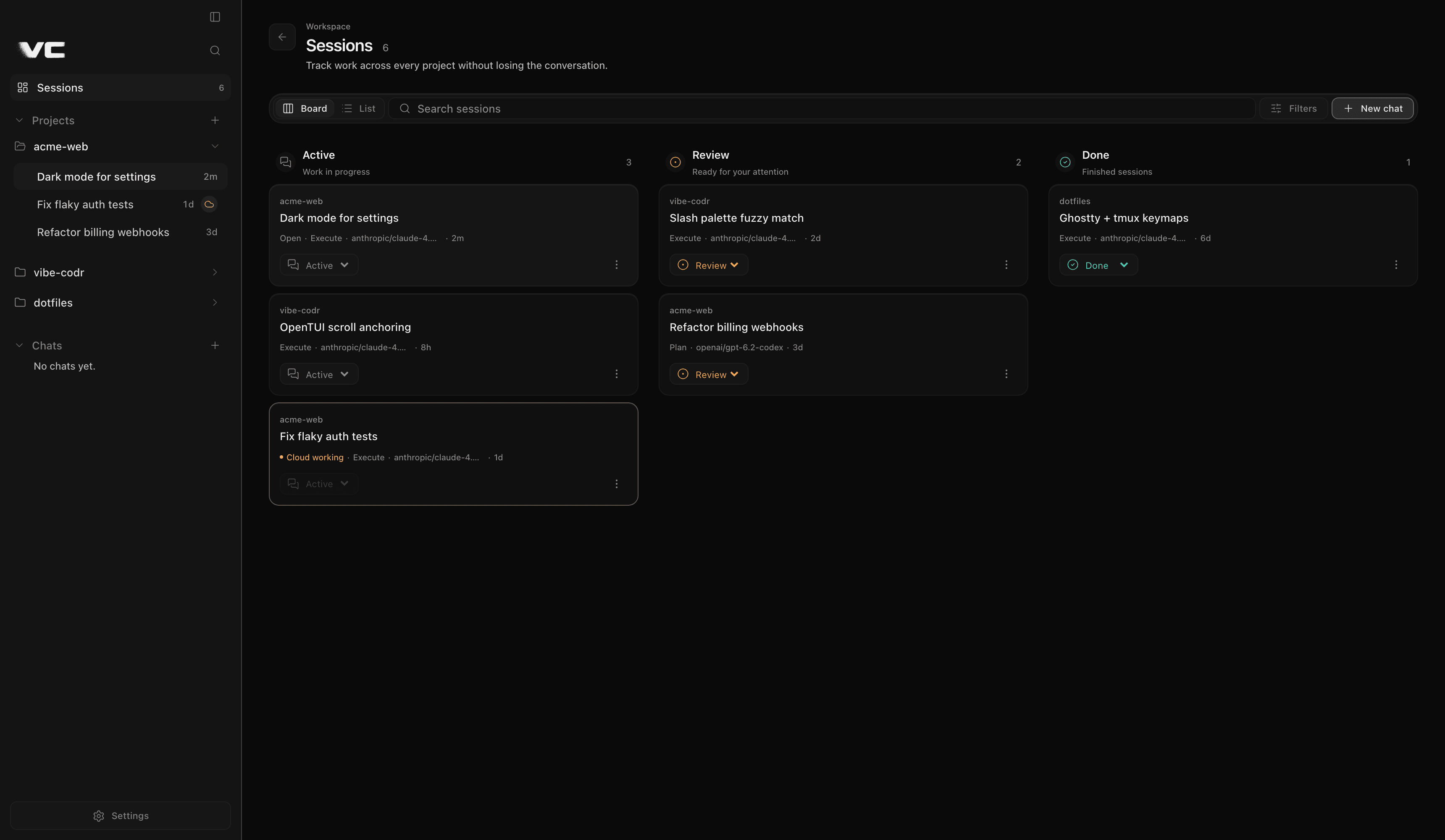
Sessions
Keep every session in view
Board and List views across every project and Chat. Search, filter, sort, move work through Active, Review, and Done, then open, rename, archive, or delete it.
One workspace. Four regions that stay out of each other's way.
Edge-attached rails and a flat dock. Resizable sidebars become drawers on narrow widths without losing chat scroll.
- 01
Project rail
Projects, Chats, and a first-class Sessions workspace with search, status organization, and complete session actions. Git and Settings stay in the footer.
- 02
Main stage
Transcript, plan and permission gates, queue, changed-files chip, and an anchored frosted composer with Local/Cloud and mode.
- 03
Workspace dock
Session, Changes, Git, Terminal, Jobs, and Files as one flat list on the chat surface. Compact icon grid on narrow widths.
- 04
Activity sidebar
Full-height right lane for Session, Changes, Git, Terminal, and Jobs. Resizable, drawer-ready, never a floating card.
What ships in the desktop app
Agent workspace, review surfaces, terminal, jobs, approvals, and handoff — product features from the live app, not a feature wishlist.
Agent workspace
Multi-provider from day one
Searchable first-run catalog from models.dev/OpenCode plus Hermes aliases and native Bedrock, Vertex, and Azure routes. Grok 4.5 adds optional Turbo processing without changing model quality or reasoning.
Projects, Chats, and Sessions
Restore the last authorized project or land in Chats. Manage every saved conversation from a persistent Board/List workspace without losing the active chat.
Composer with real controls
Plan / Agent / Yolo modes, Local / Cloud target, attachments, model pickers, queue, Stop with elapsed time, and Esc interrupt.
Dense desktop chrome
Streaming transcript
Immediate first deltas, smooth coalesced progress, tools, thinking, notices, sources, and finalized GFM with Shiki. Settled turns stay still even through long sessions.
Dock and activity lane
Session, Changes, Git, Terminal, Jobs, and Files on the chat surface. One mutual-exclusive right lane that never replaces the conversation.
One engine, two interfaces
Desktop and CLI share tools, MCP, memory, plans, orchestration, build gates, sessions, and config. The packaged app bundles its exact engine revision.
Review, terminal, jobs
Changes and Git
Footer chip after edits opens Diff/File review with a recursive tree. Git branches, history, and remotes share the same activity lane.
Persistent terminal
Main-process PTYs per effective cwd. Project sessions open at the root; Chats open at home. Closing the view never kills the shell.
Jobs and background work
Live auto-follow output, localhost links, and copy from the Jobs activity view or /jobs.
Approvals and handoff
Permissions and plans
Human-titled approval cards, plan accept/revise, deny reasons on demand, and project-scoped grants that stay global-trust safe.
Local ↔ Cloud ↔ Phone
Reviewed Cloud handoff plus secure Continue on Phone with session continuity, workspace controls, and bounded document or image attachments.
Desktop install and updates
Signed macOS .dmg and Windows NSIS. Updates check Releases after launch and never install silently.
Local or Cloud on the same composer
Pick execution location beside mode. Changing it opens a reviewed handoff, never an optimistic switch. Experimental BYO E2B or Vercel sandboxes keep the same engine revision.
- 01
Preflight review
Route, provider rows, Moves/Stays boundary, and billing note before anything ships off-machine.
- 02
Staged migration
Safe boundary through package, upload, verify, restore, health check, and connect, with live stage progress.
- 03
Fail closed
Retry only when recovery is confirmed. Non-retryable failures route to Settings → Cloud recovery.
Also in the app
@ files and drag-drop
Fuzzy @ attach, clipboard image paste, Finder drag-drop with previews, and external $VISUAL / $EDITOR compose.
Slash palette and themes
Built-in and custom commands via ⌘K. Sixteen terminal themes plus accents for the whole workspace.
Desktop-grade chrome
ARIA combobox patterns, skip links, keyboard focus traps, ErrorBoundary recovery, and strict IPC isolation.
Install the desktop app
Download Vibe Codr 0.6.12 from GitHub Releases. macOS Apple Silicon uses a signed and notarized .dmg; Windows x64 ships an NSIS installer. Packaged builds include the exact verified engine host.
- macOSApple Silicon · signed .dmg
- Windowsx64 · NSIS .exe
Updates check GitHub Releases after launch and never install silently. The engine host is bundled in packaged builds.